

Claude Messages API Application and Usage
The Messages API uses the Anthropic Messages request and response format, providing a unified interface for messages, system prompts, content blocks, tool calls, thinking controls, and streaming events. Use model to select models published through this endpoint, and clients continue to use the same set of Messages data structures.
This article introduces the application, invocation, and response handling methods for the Messages API.
¶ GPT-6.2 Astra and GPT-6.2 Sol
For model, you can select gpt-6.2-astra or gpt-6.2-sol. Text and image input and text output are supported, while tools and results are submitted in the Messages tools, tool_use, and tool_result formats. Reasoning levels support low, medium, high, xhigh, and max, while none or minimal are not supported; parameter formats are subject to this interface definition. Standard input, cache reads, cache writes, and output are billed separately. When the total input and cache volume exceeds 272,000 tokens, the entire request uses long-context pricing.
¶ Claude Fable 5.2
Use the full model name claude-fable-5-2. This model is suitable for complex reasoning and long-running tasks; when native thinking content blocks and tool interaction are required, prioritize using Messages. Adaptive thinking remains enabled continuously; omit temperature, top_p, and top_k, use auto for tool selection, and do not force a specific tool. max_tokens covers both thinking and final text. The Responses and Count Tokens interfaces are currently not available for this model.
Calculated based on the current maximum plan (142,800 Credits/$13,584), Fable 5.2 standard input costs $3.20 and output costs $16 per million tokens; cache reads cost $0.08, and 5-minute/1-hour cache writes cost $4/$6.40 per million tokens, respectively. The above prices are 40% of the official standard API list prices (60% cheaper); for other plans and additional account discounts, please refer to the model pricing page and billing.
¶ GPT-6.1 Terra
Use model: "gpt-6.1-terra" to call this model through this interface. Requests still use Messages-format messages and max_tokens, and returned text and usage also follow this interface structure. When switching models, please verify current pricing and account availability; separately reported cache read and creation tokens are billed separately.
¶ Application Process
To use the Claude Messages API, first go to the 零壹AI Console to obtain your API Token and keep it as a backup.
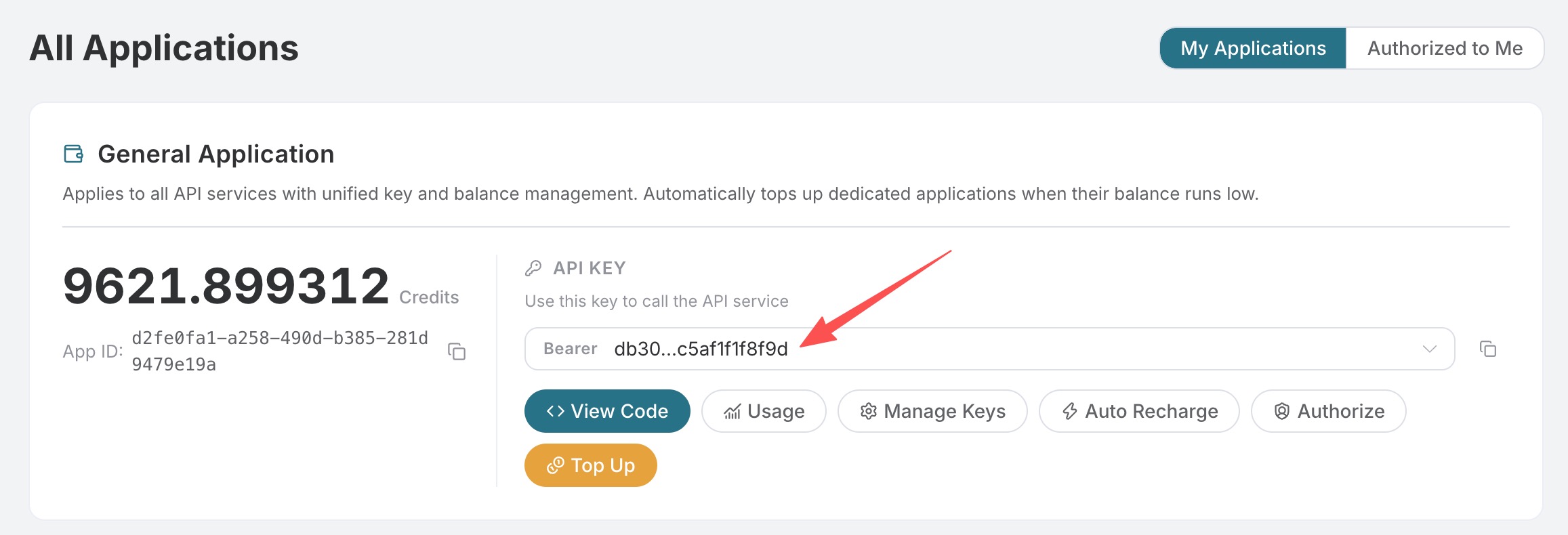
If you have not yet logged in or registered, you will be automatically redirected to the login page to register and log in, and will automatically return to the current page after completion.
One API Token can call all platform services, with no need to apply separately for each service. Your first application includes free credits for a free trial; when credits are insufficient, you can top up your general balance in the Console.
📘 Full documentation: Claude Messages API →
¶ Basic Usage
The request path for the Claude Messages API is /v1/messages, consistent with the official Anthropic API. Compatible model requests accepted by the platform are billed according to the model's input, output, and cache usage; Messages input tokens do not include separately reported cache read and creation tokens, and these dimensions are billed separately. Fees are subject to the current model pricing in the console and the response usage.cost.
We need to provide at least three required parameters:
model: Fill in the full model ID from this interface's model list. Continue to use Messages request fields and response structure when switching models; see the corresponding model's API and pricing pages for the model list, context limits, and pricing.messages: An array of input messages, where each message containsrole(role) andcontent(content), androlesupportsuserandassistant.max_tokens: The maximum number of output tokens, used to limit the length of a single response.
Common optional parameters:
system: System prompt, used to set the model's behavior and role.temperature: Generation randomness, between 0 and 1; the larger the value, the more divergent the response.stream: Whether to use streaming responses; setting it totrueenables a word-by-word return effect.stop_sequences: Custom stop sequences; the model stops generating when it encounters these texts.top_p: Nucleus sampling parameter, used with temperature to control generation randomness.top_k: Sample only from the K options with the highest probabilities.tools: Tool definitions, used to let the model call external functions.tool_choice: Controls how the model uses the provided tools.cache_control: Automatically creates a cache breakpoint at the last cacheable content block of the request; it can also be written on a specific content block.
Tool calls uniformly use tools[].input_schema, tool_choice, tool_use, and tool_result; tool_choice.disable_parallel_tool_use: true disables parallel tool calls in the same round. Thinking controls use thinking and output_config.effort, while structured output uses output_config.format. max_tokens is the output budget for this request and will not be automatically increased by the platform; thinking and body text jointly consume this budget.
Parameter values and feature limitations are subject to the interface and model documentation; when handling parameter errors, please read the specific error fields and reasons.
¶ cURL Example
curl -X POST 'https://api.01ai.cloud/v1/messages' \
  -H 'accept: application/json' \
  -H 'authorization: Bearer {token}' \
  -H 'content-type: application/json' \
  -d '{
    "model": "claude-fable-5-1",
    "max_tokens": 1024,
    "messages": [
      {
        "role": "user",
        "content": "Hello, Claude"
      }
    ]
  }'
¶ Structured Output
Use output_config.format to specify the JSON Schema, and the response still uses Messages content blocks:
{
  "output_config": {
    "format": {
      "type": "json_schema",
      "schema": {
        "type": "object",
        "properties": {"answer": {"type": "string"}},
        "required": ["answer"],
        "additionalProperties": false
      }
    }
  }
}
¶ Python Example
import requests

url = "https://api.01ai.cloud/v1/messages"

headers = {
    "accept": "application/json",
    "authorization": "Bearer {token}",
    "content-type": "application/json"
}

payload = {
    "model": "claude-fable-5-1",
    "max_tokens": 1024,
    "messages": [
        {"role": "user", "content": "Hello, Claude"}
    ]
}

response = requests.post(url, json=payload, headers=headers)
print(response.json())
After the call, the returned result is as follows:
{
  "id": "msg_013Zva2CMHLNnXjNJJKqJ2EF",
  "type": "message",
  "role": "assistant",
  "content": [
    {
      "type": "text",
      "text": "Hi! My name is Claude. How can I help you today?"
    }
  ],
  "model": "claude-opus-4-8",
  "stop_reason": "end_turn",
  "stop_sequence": null,
  "usage": {
    "input_tokens": 12,
    "output_tokens": 15
  }
}
Response result field descriptions:
id: The unique identifier for this message.type: Alwaysmessage.role: Alwaysassistant.content: An array of response content, where each element containstype(such astext) and the corresponding content.model: The name of the model that processes the request.stop_reason: The reason for stopping. Stable values includeend_turn,max_tokens,stop_sequence,tool_use,pause_turn(the current assistant content can be returned as-is to continue),refusal, andmodel_context_window_exceeded.stop_sequence: If stopped due to a custom stop sequence, displays the matched stop sequence text.stop_details: Whenstop_reasonisrefusal, it may include the refusal category and description.usage: Token usage statistics.input_tokensrefers to uncached input;cache_creation_input_tokensandcache_read_input_tokensrefer to cache writing and reading respectively;output_tokensis the total number of output tokens. Ifoutput_tokens_details.thinking_tokensis returned, this value is a subset ofoutput_tokensand should not be added again when calculating totals or costs. This detail may benullor omitted when no authoritative count is available.usage.cache_creation: Optional cache-writing TTL details, includingephemeral_5m_input_tokensandephemeral_1h_input_tokens. When the object exists, the sum of both equalscache_creation_input_tokens; a field beingnullor omitted means no TTL breakdown is available for the current response and must not be interpreted as0.usage.cost: Non-streaming responses may include an 零壹AI-recorded credit consumption object, whereamountis the actual consumption for this request,currencyis the unit of measurement, andlist_amountis the pre-discount amount (if any). The official cache-read base price for Fable 5.1 is $0.25/million Tokens, while the base prices for 5-minute and 1-hour cache writing are $12.50 and $20/million Tokens respectively; actual platform prices are converted according to plan discounts.
¶ System Prompts
The Claude Messages API supports setting system prompts through the system field, which is used to define the model's behavior, role, and context.
¶ Python Example
import requests

url = "https://api.01ai.cloud/v1/messages"

headers = {
    "accept": "application/json",
    "authorization": "Bearer {token}",
    "content-type": "application/json"
}

payload = {
    "model": "claude-sonnet-4-20250514",
    "max_tokens": 1024,
    "system": "你是一位专业的中文翻译助手,请将用户输入的英文翻译成中文。",
    "messages": [
        {"role": "user", "content": "The quick brown fox jumps over the lazy dog."}
    ]
}

response = requests.post(url, json=payload, headers=headers)
print(response.json())
By setting the system prompt, you can precisely control Claude's role and behavior.
¶ Streaming Responses
This API also supports streaming responses. Set the stream parameter to true to obtain progressively returned results, which is highly suitable for implementing character-by-character display on web pages.
¶ Python Example
import requests

url = "https://api.01ai.cloud/v1/messages"

headers = {
    "accept": "application/json",
    "authorization": "Bearer {token}",
    "content-type": "application/json"
}

payload = {
    "model": "claude-sonnet-4-20250514",
    "max_tokens": 1024,
    "stream": True,
    "messages": [
        {"role": "user", "content": "Hello, Claude"}
    ]
}

response = requests.post(url, json=payload, headers=headers, stream=True)
for line in response.iter_lines():
    if line:
        print(line.decode("utf-8"))
Streaming responses are returned in Server-Sent Events (SSE) format, with each line prefixed by event: and data:. Streaming event types include:
message_start: Message start, containing the message's basic information and model name.content_block_start: Content block start.content_block_delta: Incremental content block update, containing newly generated text fragments.content_block_stop: Content block end.message_delta: Message-level incremental update, containingstop_reasonand finalusageinformation. The authoritative value ofoutput_tokens_details.thinking_tokensshould only be read from the finalmessage_delta.usage; do not accumulate it across events.message_stop: Message end.
The output is as follows:
event: message_start
data: {"type":"message_start","message":{"id":"msg_01XFDUDYJgAACzvnptvVoYEL","type":"message","role":"assistant","content":[],"model":"claude-sonnet-4-20250514","stop_reason":null,"stop_sequence":null,"usage":{"input_tokens":12,"output_tokens":0}}}

event: content_block_start
data: {"type":"content_block_start","index":0,"content_block":{"type":"text","text":""}}

event: content_block_delta
data: {"type":"content_block_delta","index":0,"delta":{"type":"text_delta","text":"Hi"}}

event: content_block_delta
data: {"type":"content_block_delta","index":0,"delta":{"type":"text_delta","text":"! My name is"}}

event: content_block_delta
data: {"type":"content_block_delta","index":0,"delta":{"type":"text_delta","text":" Claude. How can I help you today?"}}

event: content_block_stop
data: {"type":"content_block_stop","index":0}

event: message_delta
data: {"type":"message_delta","delta":{"stop_reason":"end_turn","stop_sequence":null},"usage":{"output_tokens":15}}

event: message_stop
data: {"type":"message_stop"}
As can be seen, the content_block_delta events in the streaming response contain progressively generated text content. By concatenating all text_delta values, the complete response can be obtained.
¶ JavaScript Example
const options = {
  method: "POST",
  headers: {
    accept: "application/json",
    authorization: "Bearer {token}",
    "content-type": "application/json",
  },
  body: JSON.stringify({
    model: "claude-sonnet-4-20250514",
    max_tokens: 1024,
    stream: true,
    messages: [{ role: "user", content: "Hello, Claude" }],
  }),
};

const response = await fetch("https://api.01ai.cloud/v1/messages", options);
const reader = response.body.getReader();
const decoder = new TextDecoder();

while (true) {
  const { done, value } = await reader.read();
  if (done) break;
  console.log(decoder.decode(value));
}
¶ Multi-turn Conversations
If you want to integrate multi-turn conversation functionality, you need to alternately arrange messages with the user and assistant roles in the messages array, and pass in the previous conversation history together.
¶ Python Example
import requests

url = "https://api.01ai.cloud/v1/messages"

headers = {
    "accept": "application/json",
    "authorization": "Bearer {token}",
    "content-type": "application/json"
}

payload = {
    "model": "claude-sonnet-4-20250514",
    "max_tokens": 1024,
    "messages": [
        {"role": "user", "content": "Hello, my name is Alice."},
        {"role": "assistant", "content": "Hello Alice! Nice to meet you. How can I help you today?"},
        {"role": "user", "content": "What is my name?"}
    ]
}

response = requests.post(url, json=payload, headers=headers)
print(response.json())
The returned result is as follows:
{
  "id": "msg_01Y1wfQmd89g968TVbFu57Yc",
  "type": "message",
  "role": "assistant",
  "content": [
    {
      "type": "text",
      "text": "Your name is Alice, as you just told me!"
    }
  ],
  "model": "claude-sonnet-4-20250514",
  "stop_reason": "end_turn",
  "stop_sequence": null,
  "usage": {
    "input_tokens": 40,
    "output_tokens": 14
  }
}
By passing the complete conversation history in messages, Claude can provide accurate answers based on the context.
¶ Deep Thinking Models
Claude's thinking and thinking summary are two different concepts: the model can perform internal reasoning, but the API does not return the original chain of thought. When the reasoning process needs to be displayed, the API returns a processed summary.
Current models are recommended to use adaptive thinking, with overall reasoning effort controlled through output_config.effort:
import requests

url = "https://api.01ai.cloud/v1/messages"
headers = {
    "accept": "application/json",
    "authorization": "Bearer {token}",
    "content-type": "application/json"
}
payload = {
    "model": "claude-opus-5",
    "max_tokens": 16000,
    "thinking": {
        "type": "adaptive",
        "display": "summarized"
    },
    "output_config": {
        "effort": "high"
    },
    "messages": [
        {"role": "user", "content": "What is the sine of 30 degrees?"}
    ]
}

response = requests.post(url, json=payload, headers=headers)
print(response.json())
The thinking block in the response looks like:
{
  "type": "thinking",
  "thinking": "The problem asks for a standard trigonometric value...",
  "signature": "opaque-signature"
}
display: "summarized"returns a readable thinking summary; it is not the original chain of thought.display: "omitted"returnsthinking: "", but still retains the opaquesignatureto support subsequent conversations.display: "updates"is Anthropic's beta mode and requiresanthropic-beta: thinking-display-updates-2026-08-18. The official definition is to hide the reasoning body and display brief progress updates between tool calls. The platform passes this parameter and beta request header through as-is and does not forcibly rewrite it tosummarized; the actual output content depends on the support of the selected model.- Messages requests use
thinking,output_config, and sampling parameters. Supported values are subject to the documentation of the selected model; parameter errors will be explained in the response. - The default display value for Fable 5.1, Fable 5, Opus 5, Sonnet 5, Opus 4.8, and Opus 4.7 is
omitted; Opus 4.6, Sonnet 4.6, and earlier models that support thinking usesummarizedby default. - Display only affects returned content and streaming latency; it does not disable reasoning or reduce billing for thinking tokens.
- Whether thinking is enabled by default and the default display value are two separate questions. Opus 5 and Sonnet 5 enable adaptive thinking by default; for Opus 5, omitting
thinkingis equivalent to adaptive, and omittingoutput_config.effortis equivalent tohigh. Opus 4.8, 4.7, and 4.6 require explicit enablement. - Thinking and the final body share the
max_tokensoutput budget. When the budget is too small, thinking may consume most of the quota, leaving the body empty or truncated; please increasemax_tokens, or uselow/mediumeffort to control reasoning effort. - For models that allow thinking to be disabled, you can pass
thinking: {"type":"disabled"}. New modes such asbetween_toolsand effort combinations depend on the selected model; the platform does not reject them in advance based on old model rules. - A fixed thinking budget can be passed through
budget_tokens; new models usually usethinking.type=adaptiveandoutput_config.effort. Whether fixed budgets or disabling thinking are supported depends on the current capabilities of the selected model. - During multi-turn conversations and tool calls, the complete thinking block and signature returned by the assistant should be passed back as-is; do not modify or generate the signature yourself.
- Parameter pass-through does not mean every model supports all features. Cross-protocol calls still require conversion, and the support scope and errors for content such as
redacted_thinkingare determined by the model service that actually processes the request.
In streaming requests, summarized produces thinking_delta; omitted does not produce thinking_delta, retaining only the thinking block lifecycle and signature_delta.
¶ Vision Models
Claude supports multimodal input and can process text and images simultaneously. In the Messages API, vision capabilities can be used by setting content to an array format and passing image content blocks.
¶ Using Base64-Encoded Images
import base64
import requests

url = "https://api.01ai.cloud/v1/messages"

headers = {
    "accept": "application/json",
    "authorization": "Bearer {token}",
    "content-type": "application/json"
}

# Read and encode the image
with open("image.png", "rb") as f:
    image_data = base64.standard_b64encode(f.read()).decode("utf-8")

payload = {
    "model": "claude-sonnet-4-20250514",
    "max_tokens": 1024,
    "messages": [
        {
            "role": "user",
            "content": [
                {
                    "type": "image",
                    "source": {
                        "type": "base64",
                        "media_type": "image/png",
                        "data": image_data
                    }
                },
                {
                    "type": "text",
                    "text": "What's in this image?"
                }
            ]
        }
    ]
}

response = requests.post(url, json=payload, headers=headers)
print(response.json())
¶ Using URL Images
import requests

url = "https://api.01ai.cloud/v1/messages"

headers = {
    "accept": "application/json",
    "authorization": "Bearer {token}",
    "content-type": "application/json"
}

payload = {
    "model": "claude-sonnet-4-20250514",
    "max_tokens": 1024,
    "messages": [
        {
            "role": "user",
            "content": [
                {
                    "type": "image",
                    "source": {
                        "type": "url",
                        "url": "https://cdn.acedata.cloud/ueugot.png"
                    }
                },
                {
                    "type": "text",
                    "text": "What's in this image?"
                }
            ]
        }
    ]
}

response = requests.post(url, json=payload, headers=headers)
print(response.json())
¶ cURL Example
curl -X POST 'https://api.01ai.cloud/v1/messages' \
  -H 'accept: application/json' \
  -H 'authorization: Bearer {token}' \
  -H 'content-type: application/json' \
  -d '{
    "model": "claude-sonnet-4-20250514",
    "max_tokens": 1024,
    "messages": [
      {
        "role": "user",
        "content": [
          {
            "type": "image",
            "source": {
              "type": "url",
              "url": "https://cdn.acedata.cloud/ueugot.png"
            }
          },
          {
            "type": "text",
            "text": "What'\''s in this image?"
          }
        ]
      }
    ]
  }'
Supported image formats include: image/jpeg, image/png, image/gif, and image/webp.
¶ Documents and PDFs
PDFs use the document content block and support two stable sources: Base64 and URL. Base64 sources must use application/pdf:
import base64

with open("report.pdf", "rb") as f:
    pdf_data = base64.standard_b64encode(f.read()).decode("utf-8")

payload = {
    "model": "claude-fable-5-1",
    "max_tokens": 1024,
    "messages": [{
        "role": "user",
        "content": [
            {
                "type": "document",
                "source": {
                    "type": "base64",
                    "media_type": "application/pdf",
                    "data": pdf_data
                },
                "title": "Quarterly report"
            },
            {"type": "text", "text": "Summarize this PDF."}
        ]
    }]
}
A URL source is written as {"type":"url","url":"https://example.com/report.pdf"}. document also supports text/plain and content sources composed of text/image blocks; optional fields include title, context, and citations. The file_id source of the Files API belongs to a separate beta feature and is not part of the stable contract of this interface.
¶ Prompt Caching
Top-level cache_control automatically places the cache breakpoint on the last cacheable block:
payload = {
    "model": "claude-fable-5-1",
    "max_tokens": 1024,
    "cache_control": {"type": "ephemeral", "ttl": "5m"},
    "system": "You are an expert on this reference material.",
    "messages": [{"role": "user", "content": "Summarize the key points."}]
}
When precise position control is needed, the same cache_control can also be written on text, image, document, tool_use, tool_result content blocks, or tool definitions. ttl supports 5m (default) and 1h; use usage.cache_creation_input_tokens and usage.cache_read_input_tokens to determine cache writes and hits.
When the response provides usage.cache_creation, ephemeral_5m_input_tokens + ephemeral_1h_input_tokens = cache_creation_input_tokens. If cache_creation is null or omitted, it means there is only a total cache write amount and no authoritative TTL breakdown; in this case, do not treat either bucket as a known 0, and billing and totals should still be based on the aggregate fields.
Example returned result:
{
  "id": "msg_01NCrxpZmV17bhQJJRQEFEb9",
  "type": "message",
  "role": "assistant",
  "content": [
    {
      "type": "text",
      "text": "This image shows an API request configuration interface for what appears to be an AI chat completion service. The interface includes parameters for model selection, messages, stream mode, and max tokens settings."
    }
  ],
  "model": "claude-sonnet-4-20250514",
  "stop_reason": "end_turn",
  "stop_sequence": null,
  "usage": {
    "input_tokens": 1570,
    "output_tokens": 52
  }
}
¶ Tool Use
The Claude Messages API natively supports tool use, allowing the model to call your predefined tools/functions when needed.
¶ Python Example
import requests

url = "https://api.01ai.cloud/v1/messages"

headers = {
    "accept": "application/json",
    "authorization": "Bearer {token}",
    "content-type": "application/json"
}

payload = {
    "model": "claude-sonnet-4-20250514",
    "max_tokens": 1024,
    "tools": [
        {
            "name": "get_weather",
            "description": "Get the current weather in a given location",
            "input_schema": {
                "type": "object",
                "properties": {
                    "location": {
                        "type": "string",
                        "description": "The city and state, e.g. San Francisco, CA"
                    }
                },
                "required": ["location"]
            }
        }
    ],
    "messages": [
        {"role": "user", "content": "What's the weather like in San Francisco?"}
    ]
}

response = requests.post(url, json=payload, headers=headers)
print(response.json())
When the model decides to call a tool, the content in the returned result will contain a content block of type tool_use:
{
  "id": "msg_01Aq9w938a90dw8q",
  "type": "message",
  "role": "assistant",
  "content": [
    {
      "type": "text",
      "text": "Let me check the weather in San Francisco for you."
    },
    {
      "type": "tool_use",
      "id": "toolu_01A09q90qw90lq917835lgs",
      "name": "get_weather",
      "input": {
        "location": "San Francisco, CA"
      }
    }
  ],
  "model": "claude-sonnet-4-20250514",
  "stop_reason": "tool_use",
  "stop_sequence": null,
  "usage": {
    "input_tokens": 120,
    "output_tokens": 68
  }
}
Note that stop_reason is tool_use, indicating that the model needs to call a tool. After receiving this result, you need to execute the tool function and return the result to the model in the form of tool_result:
payload = {
    "model": "claude-sonnet-4-20250514",
    "max_tokens": 1024,
    "tools": [
        {
            "name": "get_weather",
            "description": "Get the current weather in a given location",
            "input_schema": {
                "type": "object",
                "properties": {
                    "location": {
                        "type": "string",
                        "description": "The city and state, e.g. San Francisco, CA"
                    }
                },
                "required": ["location"]
            }
        }
    ],
    "messages": [
        {"role": "user", "content": "What's the weather like in San Francisco?"},
        {
            "role": "assistant",
            "content": [
                {"type": "text", "text": "Let me check the weather in San Francisco for you."},
                {"type": "tool_use", "id": "toolu_01A09q90qw90lq917835lgs", "name": "get_weather", "input": {"location": "San Francisco, CA"}}
            ]
        },
        {
            "role": "user",
            "content": [
                {
                    "type": "tool_result",
                    "tool_use_id": "toolu_01A09q90qw90lq917835lgs",
                    "content": "Sunny, 72°F"
                }
            ]
        }
    ]
}

response = requests.post(url, json=payload, headers=headers)
print(response.json())
The model will generate the final natural-language response based on the result returned by the tool.
¶ Differences from the Chat Completion API
零壹AI provides two Claude API formats at the same time. The main differences between them are as follows:
The Messages API's usage.input_tokens represents only uncached input, while cache_read_input_tokens and cache_creation_input_tokens are independently billed buckets; all three are calculated separately according to their respective prices.
| Feature | Messages API (/v1/messages) |
Chat Completion API (/v1/chat/completions) |
|---|---|---|
| Format | Anthropic native format | OpenAI-compatible format |
| System prompt | Separate system field |
Passed through role: "system" in messages |
| Response structure | content array (supports multiple types) |
choices array (contains message) |
| Streaming format | SSE events (multiple event types) | SSE data lines |
| Extended thinking | Native thinking and output_config.effort |
Model default strategy and compatibility parameters |
| Tool calls | Native tools + input_schema |
OpenAI-compatible tools format |
| Token statistics | output_tokens_details.thinking_tokens |
completion_tokens_details.reasoning_tokens |
If your system has already integrated with the OpenAI-format API, you can use the Chat Completion API to switch seamlessly. If you need to use all of Claude's native capabilities, it is recommended to use the Messages API.
¶ Error Handling
Error responses from public APIs use the 零壹AI platform envelope: error.code is the stable error code, error.message is the description, and trace_id is used for request troubleshooting. Common HTTP statuses include:
400: Request parameters or protocol content is invalid.401: Authorization token is invalid, missing, or expired.403: Access is forbidden, balance is insufficient, or quota is restricted.404: API or model does not exist.413: Request body is too large.429: Too many requests.500/503/504: Service error, temporarily unavailable, or processing timeout.
¶ Error Response Example
{
  "error": {
    "code": "api_error",
    "message": "fetch failed"
  },
  "trace_id": "2cf86e86-22a4-46e1-ac2f-032c0f2a4e89"
}
This error structure is the runtime contract of 零壹AI and is not equivalent to Anthropic's official error envelope; please handle it according to the HTTP status and error.code.
¶ Conclusion
Through this document, you have learned how to use the Claude Messages API to invoke Claude's conversational capabilities in Anthropic's native format. The Messages API supports rich features such as basic conversations, system prompts, streaming responses, multi-turn conversations, extended thinking, visual understanding, PDFs, prompt caching, and tool calls. If you have any questions, please feel free to contact our technical support team.